Pathways
A pathway is a product system: the chain of processes that turns feedstocks into a final product. This page covers the pathway editor. To read what a pathway produces, see Pathway Results.
Build a Pathway
Build a pathway on a canvas of nodes joined by connections, in the same layout as a transportation step. Select an entity in the library and drag it onto the canvas. The nodes are pathway mixes, stationary processes, transportation processes and other pathways, and they lead to a final Product. A pathway collects every operation in a production sequence, so it is the level at which PyGREET gives you results for the whole life cycle.
What a Pathway Can Contain
A pathway is a directed graph. It can include cyclic dependencies, which lets you model detailed industrial sites. A refinery pathway, for example, can hold several internal activities and outputs:
- Internal activities: distillation, hydrocracking, alkylation and polymerization.
- Outputs: gasoline, solvents, jet fuel and residual oil.
You can reuse a pathway as a feedstock for another pathway instead of rebuilding it. For example, the "Corn Production" pathway is the input to the "Ethanol Production from Corn" pathway.
To reuse a pathway, drag it from the library onto the canvas. A nested pathway does not show its inputs. Only its final outputs are available to link to the inputs of later processes.
Tabs of the Pathway Editor
The pathway editor has four bottom tabs:
| Tab | What it holds |
|---|---|
| General Information Tab | The name and notes of the pathway |
| Pathway Editor Tab | The canvas where you modify the pathway |
| Results Tab | The pathway results (see Pathway Results) |
| Usage Tab | Where the pathway is used (see Usage Tab) |
Node Colors
Nodes are color coded:
| Color | Node |
|---|---|
| Yellow | Transportation processes |
| Light blue | Stationary processes |
| Green | Pathways |
| Dark blue | Pathway mixes |
| Red | Vehicles |
Process Nodes
Stationary and transportation processes are the main nodes of a pathway.
- Most stationary processes, and all transportation processes, take an input and give an output.
- A separate stationary process, pathway or pathway mix must supply each input that needs a source.

Inputs that do not come from a previous source do not appear on the node, because they need no connection. These are inputs that are primary resources, or inputs whose source is defined in the stationary process. Every input you see must have a source.
Warning
- Use pathway and pathway mix nodes only at the beginning of a pathway.
- Use a transportation process node as an intermediate or final node, never as the first node, because it needs an input.
Outputs
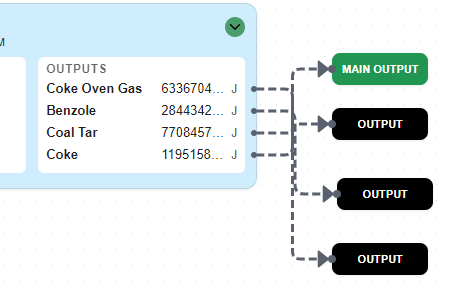
Stationary and transportation processes have one or more outputs. You can connect an output to another node, or drag it onto the canvas to make an output node.
Output nodes are the final products of a pathway when no vehicle is present.
- A pathway can have more than one output node.
- A pathway must have exactly one Main Output, the central output of the pathway.
To make a Main Output, right-click an output node and select Make Main Output.
Vehicle Nodes
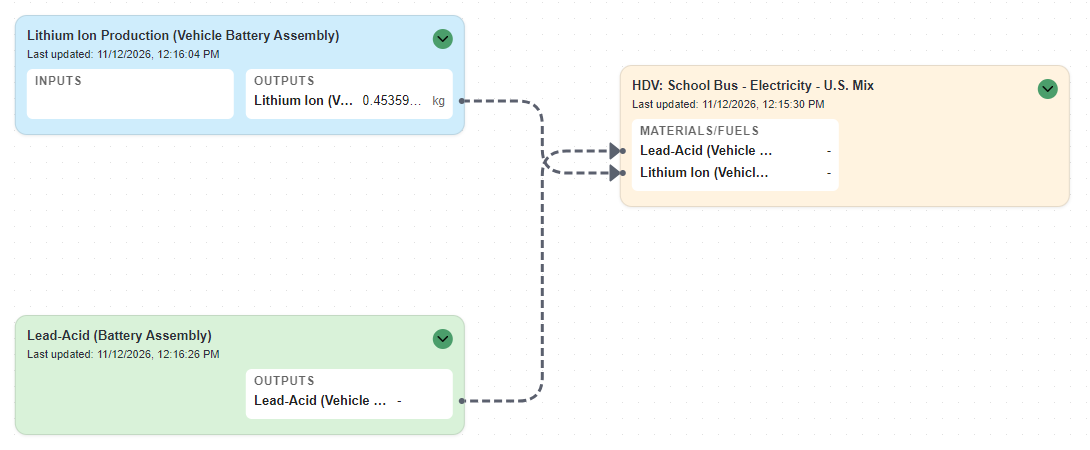
A vehicle node has one or more inputs, like a stationary process. You can add a vehicle to a pathway only when one of its fuels or materials has the source "Output of Previous Process". The vehicle then takes that fuel or material from the node that supplies it.
Vehicle limitation
A vehicle must be the final Product of the pathway. You cannot use it as an intermediate step. The pathway can have no other outputs, and the vehicle node is the main output.
Next
Read the pathway's results: the results table, the contribution charts, Contribution Analysis and the Graphical Results View.